---
title: How to Link a Parent to a Student in B+
description: This article will show you how to quickly link family members together on your Bursary+ platform
---
[Skip to content](https://helpdesk.applicaa.com/bursaryplus/how-to-link-a-parent-to-a-student-in-b#main-content)
English - United Kingdom
Show submenu for translations
.png?width=150&height=52&name=Applicaa%20Logos%20(2).png)
Open main navigation
Close main navigation
- English - United Kingdom
Show submenu for translations
How can we help you?
- There are no suggestions because the search field is empty.
1. [Bursary+](https://helpdesk.applicaa.com/bursaryplus?hsLang=en-gb)
2. [Getting Started](https://helpdesk.applicaa.com/bursaryplus/getting-started?hsLang=en-gb)
# How to Link a Parent to a Student in B+
## This article will show you how to quickly link family members together on your Bursary+ platform
To **easily access a student's profile, you can use the search bar** located at the top middle section of the platform, next to the Knowledge Base button. Accounts with matching name letters will be suggested as you type in the student's name. You should also **see whether an account belongs to a student or a parent.**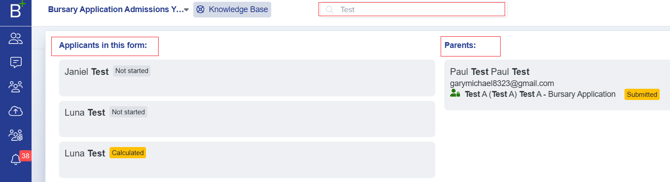
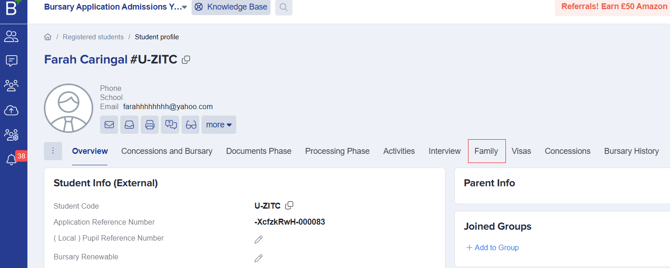
When you click on a student's name, you will be directed to their profile. Look for the **Family** tab.
You will then see a field where you can enter the parent's name or email address, along with a **Save** button to successfully link the student's account to their parent.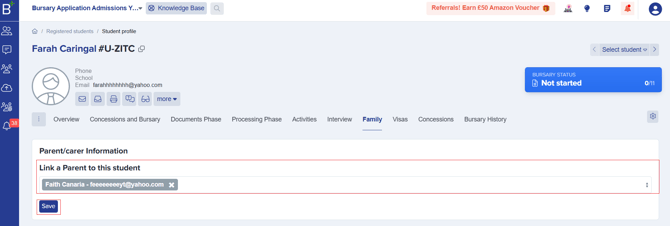
- [Getting Started](https://helpdesk.applicaa.com/bursaryplus/getting-started?hsLang=en-gb)
- [Maintenance and Reporting](https://helpdesk.applicaa.com/bursaryplus/maintenance-and-reporting?hsLang=en-gb)
- [Bursary Settings](https://helpdesk.applicaa.com/bursaryplus/bursary-settings?hsLang=en-gb)
- [Communications and Renewals](https://helpdesk.applicaa.com/bursaryplus/communications-and-renewals?hsLang=en-gb)
[.png?width=250&height=86&name=Applicaa%20Logos%20(2).png "Applicaa Logos (2)")](http://applicaa.com)
[mailto:email@email.com](mailto:email@email.com)
Copyright © 2026, Applicaa