---
title: How to Add Liabilities as a Question in Your Bursary Form
description: This article will show you how to enable/disable questions about liabilities on your bursary form.
---
[Skip to content](https://helpdesk.applicaa.com/bursaryplus/how-to-add-liabilities-as-a-question-in-your-bursary-form#main-content)
English - United Kingdom
Show submenu for translations
.png?width=150&height=52&name=Applicaa%20Logos%20(2).png)
Open main navigation
Close main navigation
- English - United Kingdom
Show submenu for translations
How can we help you?
- There are no suggestions because the search field is empty.
1. [Bursary+](https://helpdesk.applicaa.com/bursaryplus?hsLang=en-gb)
2. [Getting Started](https://helpdesk.applicaa.com/bursaryplus/getting-started?hsLang=en-gb)
# How to Add Liabilities as a Question in Your Bursary Form
## This article will show you how to enable/disable questions about liabilities on your bursary form.
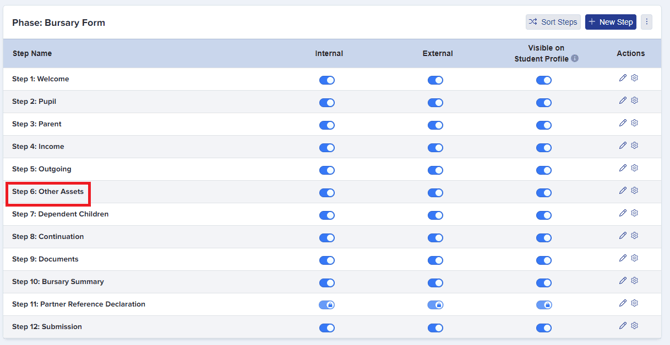
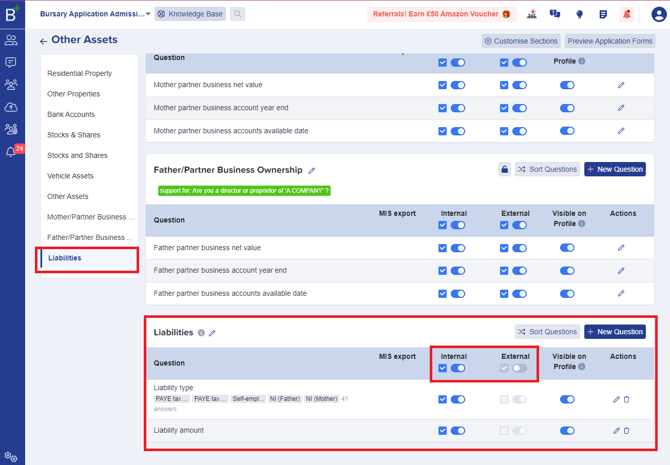
To enable the 'Liabilities' section from your bursary application form, click to 'Other Assets' step then scroll down to locate the Liabilities section as shown below.
- It is enabled / disabled on the Application form settings and you can configure the options too. You can switch the toggle button ON to enable the 'Liabilities' section as well as the questions under it.
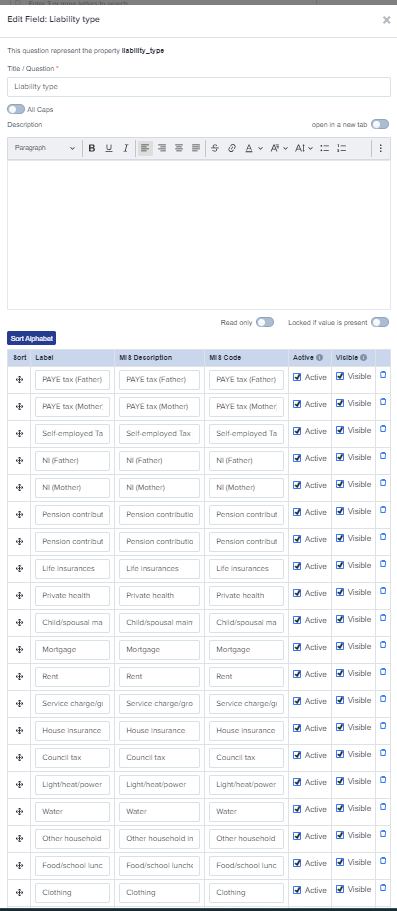
- It comes with a long list of lookups that you can turn on or off and you can also add your own.
- It can be included in the Asset value (or other) calculation as required in the formula menu.
-png.png?width=670&height=228&name=image%20(8)-png.png)
- [Getting Started](https://helpdesk.applicaa.com/bursaryplus/getting-started?hsLang=en-gb)
- [Maintenance and Reporting](https://helpdesk.applicaa.com/bursaryplus/maintenance-and-reporting?hsLang=en-gb)
- [Bursary Settings](https://helpdesk.applicaa.com/bursaryplus/bursary-settings?hsLang=en-gb)
- [Communications and Renewals](https://helpdesk.applicaa.com/bursaryplus/communications-and-renewals?hsLang=en-gb)
[.png?width=250&height=86&name=Applicaa%20Logos%20(2).png "Applicaa Logos (2)")](http://applicaa.com)
[mailto:email@email.com](mailto:email@email.com)
Copyright © 2026, Applicaa