---
title: How to Add a Dashboard Card in Bursary+
description: This guide will show you how to create a tile or dashboard card in your bursary system.
---
[Skip to content](https://helpdesk.applicaa.com/bursaryplus/how-to-add-a-dashboard-card-in-bursary#main-content)
English - United Kingdom
Show submenu for translations
.png?width=150&height=52&name=Applicaa%20Logos%20(2).png)
Open main navigation
Close main navigation
- English - United Kingdom
Show submenu for translations
How can we help you?
- There are no suggestions because the search field is empty.
1. [Bursary+](https://helpdesk.applicaa.com/bursaryplus?hsLang=en-gb)
2. [Getting Started](https://helpdesk.applicaa.com/bursaryplus/getting-started?hsLang=en-gb)
# How to Add a Dashboard Card in Bursary+
## This guide will show you how to create a tile or dashboard card in your bursary system.
Your dashboard is the first page you see when you log in, displaying key information through pre-set tiles/cards. These help you track applicants based on selected filters.
### **Creating a Dashboard Tile**
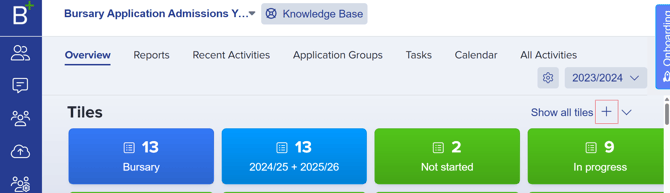
1. Click the **+ icon** beside the dashboard tiles.
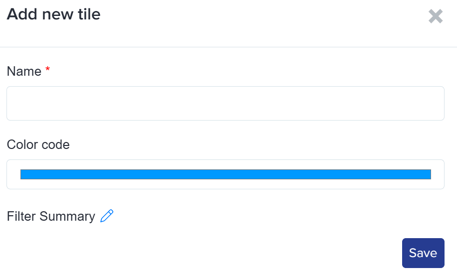
2. **Name the tile**, choose a **color**, and set the **filter summary** based on your preference
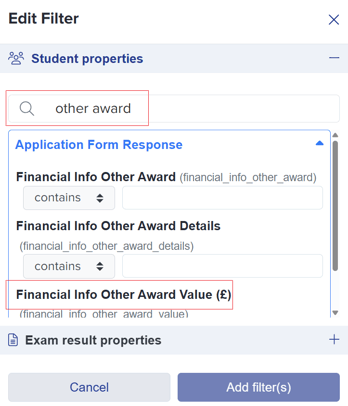
3. Use the search function or scroll through the list to **find your desired filter** (e.g., Other Award responses).
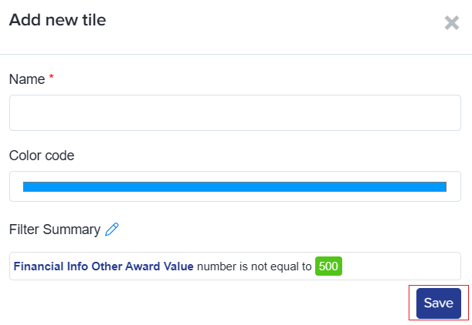
4. Click **Save** to create the tile.
### **Additional Filters**
You can filter data beyond application responses.
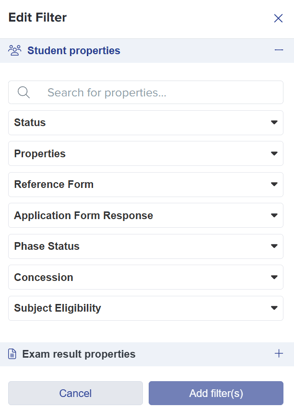
There is no limit to the number of tiles you can create, but having **15+ tiles** may slow loading times.
- [Getting Started](https://helpdesk.applicaa.com/bursaryplus/getting-started?hsLang=en-gb)
- [Maintenance and Reporting](https://helpdesk.applicaa.com/bursaryplus/maintenance-and-reporting?hsLang=en-gb)
- [Bursary Settings](https://helpdesk.applicaa.com/bursaryplus/bursary-settings?hsLang=en-gb)
- [Communications and Renewals](https://helpdesk.applicaa.com/bursaryplus/communications-and-renewals?hsLang=en-gb)
[.png?width=250&height=86&name=Applicaa%20Logos%20(2).png "Applicaa Logos (2)")](http://applicaa.com)
[mailto:email@email.com](mailto:email@email.com)
Copyright © 2026, Applicaa