---
title: Where can I see all the Bursary Applications?
description: This article shows you where to find all the bursary applications on your system.
---
[Skip to content](https://helpdesk.applicaa.com/b16/where-can-i-see-all-the-bursary-applications#main-content)
English
Show submenu for translations
[.png?width=200&height=69&name=Applicaa%20Logos%20(2).png)](https://www.applicaa.com)
Open main navigation
Close main navigation
- English
Show submenu for translations
How can we help you?
- There are no suggestions because the search field is empty.
1. [Bursary 16+](https://helpdesk.applicaa.com/b16?hsLang=en)
2. [Managing Data](https://helpdesk.applicaa.com/b16/managing-data?hsLang=en)
# Where can I see all the Bursary Applications?
## This article shows you where to find all the bursary applications on your system.
Once you are on the Dashboard you should be able to see a dashboard card that says "Bursary".
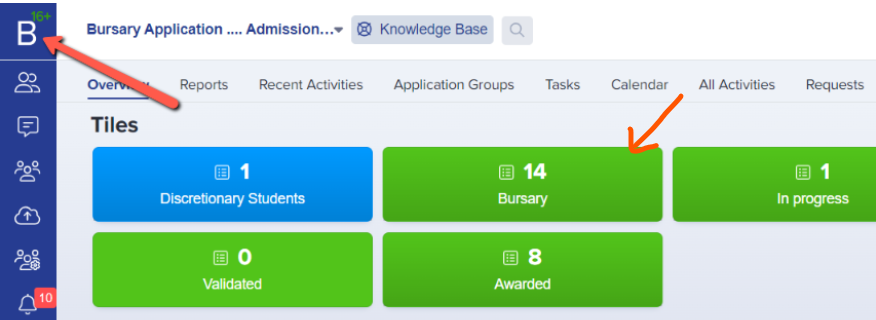
Once you've clicked the tile it will give you a list of students that applied for a bursary on your system. (you may filter them from there but it will, by default, show you all of the bursary applications regardless of what bursary status they currently sit in).

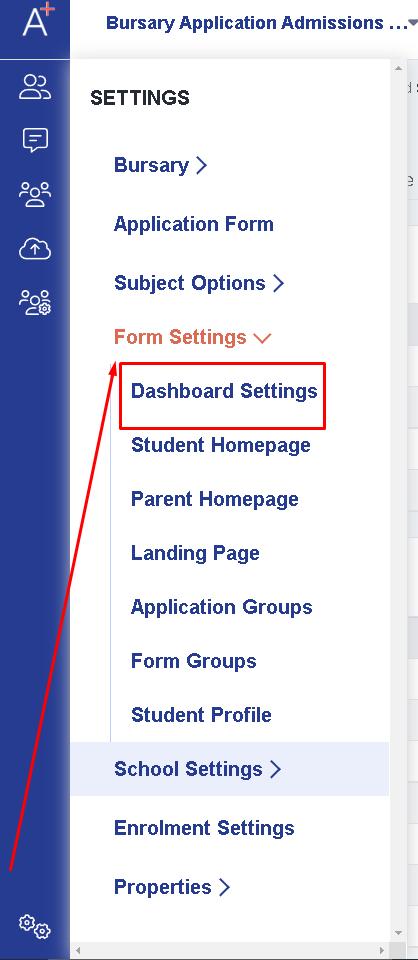
If the dashboard card isn't available you may activate it by going to Settings \> Form Settings \> Dashboard Settings.
Then it will show you a list of default dashboards and just activate the "bursary" dashboard.
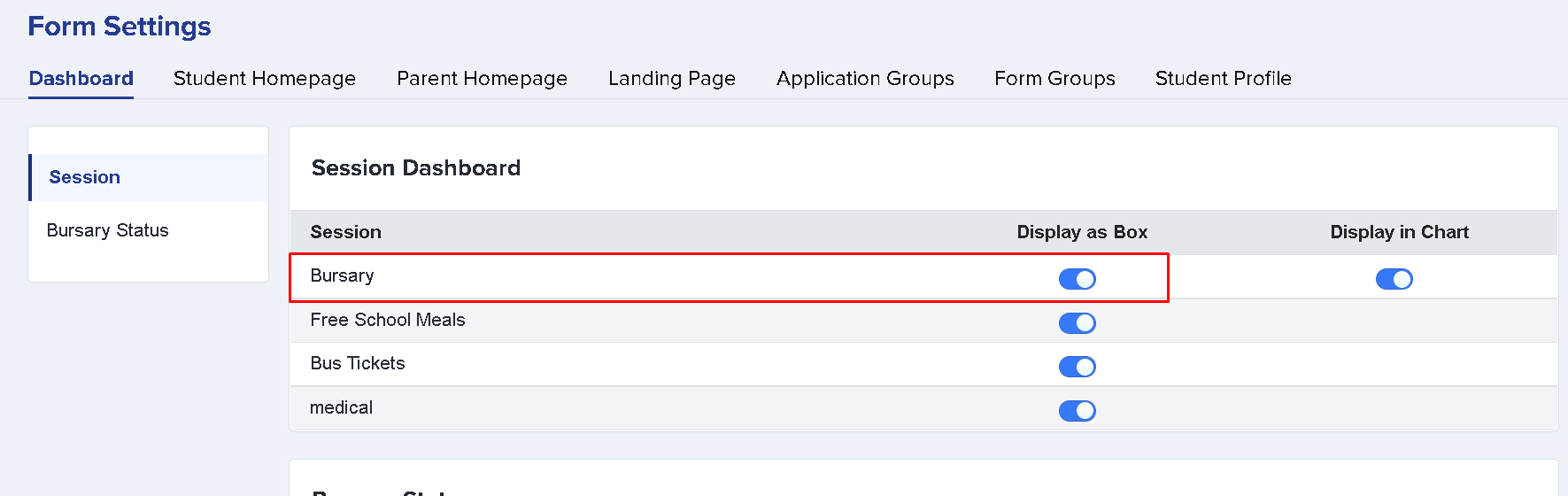
Once enabled it will allow you to select it from the Dashboard along with the other tiles.
- [Getting started](https://helpdesk.applicaa.com/b16/getting-started?hsLang=en)
- [Your Second Cycle and Beyond](https://helpdesk.applicaa.com/b16/your-second-cycle-and-beyond?hsLang=en)
- [Student Requests & School Expenses](https://helpdesk.applicaa.com/b16/student-requests-school-expenses?hsLang=en)
- [Staff and Student Settings](https://helpdesk.applicaa.com/b16/staff-and-student-settings?hsLang=en)
- [Managing Data](https://helpdesk.applicaa.com/b16/managing-data?hsLang=en)
- [Checks, Troubleshooting & Go-Live](https://helpdesk.applicaa.com/b16/checks-troubleshooting-go-live?hsLang=en)
[.png?width=250&height=86&name=Applicaa%20Logos%20(2).png "Applicaa Logos (2)")](http://applicaa.com)
[mailto:email@email.com](mailto:email@email.com)
Copyright © 2026, Applicaa