---
title: "Troubleshooting guide: Bursary bands are not showing in student profile"
description: Guide on how to troubleshoot if the Band Allocation is not showing on student profile
---
[Skip to content](https://helpdesk.applicaa.com/b16/troubleshooting-guide-bursary-bands-are-not-showing-in-student-profile#main-content)
English
Show submenu for translations
[.png?width=200&height=69&name=Applicaa%20Logos%20(2).png)](https://www.applicaa.com)
Open main navigation
Close main navigation
- English
Show submenu for translations
How can we help you?
- There are no suggestions because the search field is empty.
1. [Bursary 16+](https://helpdesk.applicaa.com/b16?hsLang=en)
2. [Checks, Troubleshooting & Go-Live](https://helpdesk.applicaa.com/b16/checks-troubleshooting-go-live?hsLang=en)
# Troubleshooting guide: Bursary bands are not showing in student profile
## Guide on how to troubleshoot if the Band Allocation is not showing on student profile
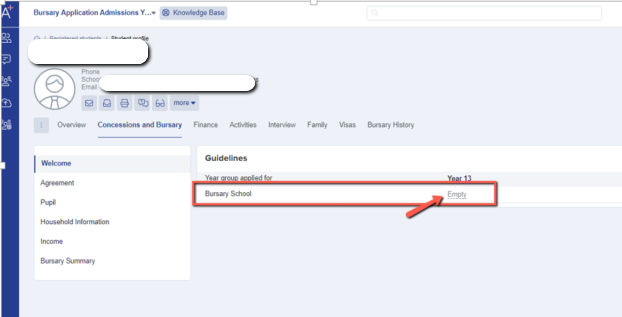
**1.** On the **Concessions and Bursary** tab,check if the **Bursary School** name is empty then select the school name accordingly and refresh the page.
****
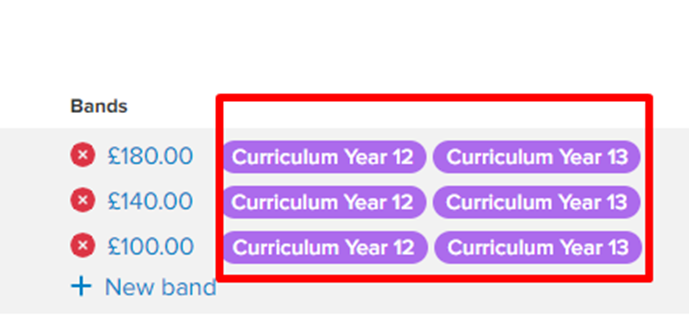
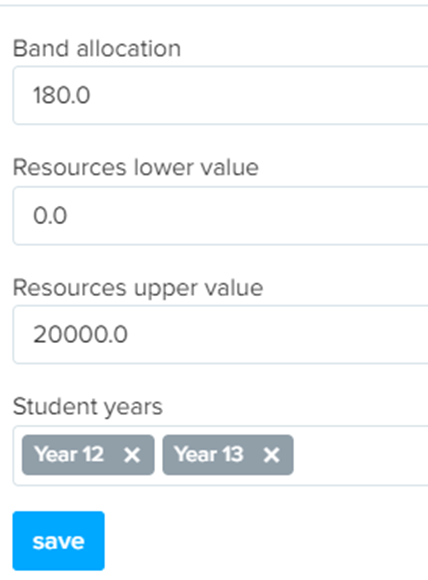
**2.** In your **Schools and Settings** area (from the main dashboard) check the **Bursary Bands** resources values are correct and that the **curriculum years** are selected for year 12 & Year 13 if applicable to both groups.
**Check that the student profile notes the student as being in one of these year groups.**
****
****
**3.** On the **student profile**, check if there is an **office value** or **user value** indicated in the **income step** of the application form for the student.
**Note that the office value will be used to calculate eligibility if there are values present.**
****
**4.** On the **student profile**, check if the **Bursary status** is set to **“Awarded”.**
****
**5.** If you are using the **dependent child allowance**, this may have moved your applicant into a **negative total household income** (for example if their household income is £0 and they have other children in the household, £100 per child will be deducted from their total, putting them into negative figures and therefore meaning they don't currently fit into a band of funding.

**If the issue still persists, please contact our Support Team on 0203 667 0764 for further assistance.**
- [Getting started](https://helpdesk.applicaa.com/b16/getting-started?hsLang=en)
- [Your Second Cycle and Beyond](https://helpdesk.applicaa.com/b16/your-second-cycle-and-beyond?hsLang=en)
- [Student Requests & School Expenses](https://helpdesk.applicaa.com/b16/student-requests-school-expenses?hsLang=en)
- [Staff and Student Settings](https://helpdesk.applicaa.com/b16/staff-and-student-settings?hsLang=en)
- [Managing Data](https://helpdesk.applicaa.com/b16/managing-data?hsLang=en)
- [Checks, Troubleshooting & Go-Live](https://helpdesk.applicaa.com/b16/checks-troubleshooting-go-live?hsLang=en)
[.png?width=250&height=86&name=Applicaa%20Logos%20(2).png "Applicaa Logos (2)")](http://applicaa.com)
[mailto:email@email.com](mailto:email@email.com)
Copyright © 2026, Applicaa