---
title: How to upload or update your school's privacy policy in your Bursary 16+ form
description: This guide will tell you how you can update or upload your school's privacy policy, which all students must agree to before using the platform to apply for the bursary. Please note this is different to your Bursary Policy.
---
[Skip to content](https://helpdesk.applicaa.com/b16/how-to-upload-or-update-your-schools-privacy-policy-in-your-bursary-16-form#main-content)
English
Show submenu for translations
[.png?width=200&height=69&name=Applicaa%20Logos%20(2).png)](https://www.applicaa.com)
Open main navigation
Close main navigation
- English
Show submenu for translations
How can we help you?
- There are no suggestions because the search field is empty.
1. [Bursary 16+](https://helpdesk.applicaa.com/b16?hsLang=en)
2. [Getting started](https://helpdesk.applicaa.com/b16/getting-started?hsLang=en)
# How to upload or update your school's privacy policy in your Bursary 16+ form
## This guide will tell you how you can update or upload your school's privacy policy, which all students must agree to before using the platform to apply for the bursary. Please note this is different to your Bursary Policy.
For you to update your school's privacy policy you will need to go to Settings \> School Settings \> General Settings
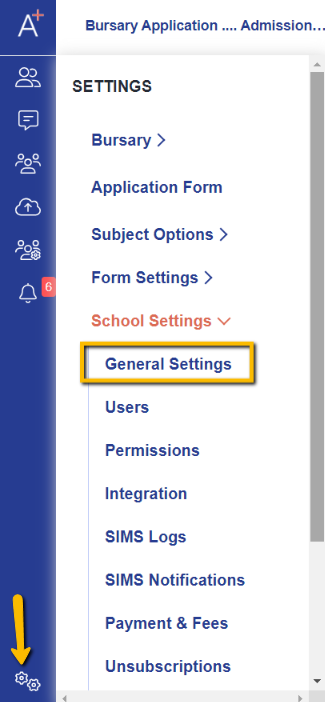
Under General Settings you'll see the Basic School Information area and you will need to click "Edit".

By clicking "Edit", the system will allow you to add the URL for your privacy policy, and an upload facility will also appear where you may attach your document if you have it saved as a document. (Please note that this could be a PDF file or a Word document).

Once you've selected a file to upload, click on "Save" so that changes will be applied to your system.
After this, your updated privacy policy will be available for students to agree upon registration.
Without a privacy policy in place, students are unable to apply for the bursary so it is important to ensure this is in place prior to launching your application cycle.
- [Getting started](https://helpdesk.applicaa.com/b16/getting-started?hsLang=en)
- [Your Second Cycle and Beyond](https://helpdesk.applicaa.com/b16/your-second-cycle-and-beyond?hsLang=en)
- [Student Requests & School Expenses](https://helpdesk.applicaa.com/b16/student-requests-school-expenses?hsLang=en)
- [Staff and Student Settings](https://helpdesk.applicaa.com/b16/staff-and-student-settings?hsLang=en)
- [Managing Data](https://helpdesk.applicaa.com/b16/managing-data?hsLang=en)
- [Checks, Troubleshooting & Go-Live](https://helpdesk.applicaa.com/b16/checks-troubleshooting-go-live?hsLang=en)
[.png?width=250&height=86&name=Applicaa%20Logos%20(2).png "Applicaa Logos (2)")](http://applicaa.com)
[mailto:email@email.com](mailto:email@email.com)
Copyright © 2026, Applicaa