---
title: How to change your timeout setting
description: This article will show you how to change the length of time you can be inactive in your bursary platform before being signed out.
---
[Skip to content](https://helpdesk.applicaa.com/b16/how-to-change-your-timeout-setting#main-content)
English
Show submenu for translations
[.png?width=200&height=69&name=Applicaa%20Logos%20(2).png)](https://www.applicaa.com)
Open main navigation
Close main navigation
- English
Show submenu for translations
How can we help you?
- There are no suggestions because the search field is empty.
1. [Bursary 16+](https://helpdesk.applicaa.com/b16?hsLang=en)
2. [Getting started](https://helpdesk.applicaa.com/b16/getting-started?hsLang=en)
# How to change your timeout setting
## This article will show you how to change the length of time you can be inactive in your bursary platform before being signed out.
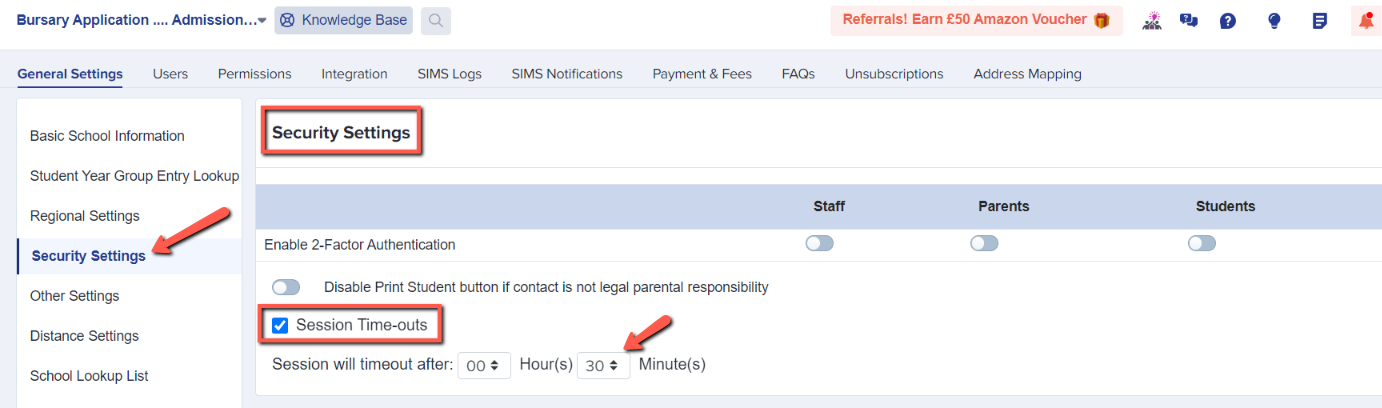
You can change the length of time your system will keep you logged in for by navigating to Settings \> School Settings \> General Settings

You can then click on "security settings" in the left-hand menu and change the settings for your system timeouts:
- [Getting started](https://helpdesk.applicaa.com/b16/getting-started?hsLang=en)
- [Your Second Cycle and Beyond](https://helpdesk.applicaa.com/b16/your-second-cycle-and-beyond?hsLang=en)
- [Student Requests & School Expenses](https://helpdesk.applicaa.com/b16/student-requests-school-expenses?hsLang=en)
- [Staff and Student Settings](https://helpdesk.applicaa.com/b16/staff-and-student-settings?hsLang=en)
- [Managing Data](https://helpdesk.applicaa.com/b16/managing-data?hsLang=en)
- [Checks, Troubleshooting & Go-Live](https://helpdesk.applicaa.com/b16/checks-troubleshooting-go-live?hsLang=en)
[.png?width=250&height=86&name=Applicaa%20Logos%20(2).png "Applicaa Logos (2)")](http://applicaa.com)
[mailto:email@email.com](mailto:email@email.com)
Copyright © 2026, Applicaa